
<title>Cubits › Frequently Asked Questions</title>

<link rel="stylesheet" type="text/css" media="screen" href="stylesheets/main.css" />
<link rel="stylesheet" type="text/css" media="screen" href="stylesheets/fancybox.css" />

<script src="http://mint.distrustsimplicity.net/?js" type="text/javascript"></script>
<script src="http://ajax.googleapis.com/ajax/libs/jquery/1.3.2/jquery.min.js" type="text/javascript"></script>
<script src="javascripts/jquery.embedquicktime.js" type="text/javascript" charset="utf-8"></script>
<script src="javascripts/jquery.fancybox.js" type="text/javascript" charset="utf-8"></script>
<script src="javascripts/jquery.easing.1.3.js" type="text/javascript" charset="utf-8"></script>

<script type="text/javascript">
    $(document).ready(function() {
        jQuery.embedquicktime({
            jquery: 'http://ajax.googleapis.com/ajax/libs/jquery/1.3.2/jquery.min.js',
            plugin: 'javascripts/jquery.embedquicktime.js'
        });
    });
    $(document).ready(function() {
        $("a.link").fancybox({
            'zoomOpacity'           : true,
            'zoomSpeedIn'           : 300,
            'zoomSpeedOut'          : 300,
            });
    });
</script>
<!--[if IE 6]>
    <link rel="stylesheet" type="text/css" media="screen" href="stylesheets/main-IE6.css" />
    <script src="javascripts/DD_belatedPNG.js"></script>
    <script>
      /* EXAMPLE */
      DD_belatedPNG.fix('#iphone, #iphone a, h1, .link .img');

      /* string argument can be any CSS selector */
      /* change it to what suits you! */
    </script>
<![endif]-->
Universal
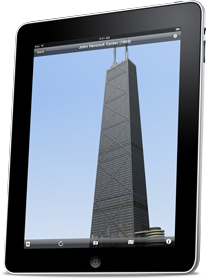
Now everything that made Cubits great on the iPhone is available for the iPad as well. The interface was redesigned to take advantage of the iPad's larger screen and uses many iPad-specific features.
Better still, you won't have to repurchase Cubits for your iPad — buy it once and run it on both your iPhone & iPad.
                    <h2>Intuitive</h2>
                    <p>Multitouch gestures make manipulating objects in three dimensions more natural than ever before. Orbit objects using one finger to rotate, two to pan (i.e. shift the center of your orbit), and pinch to zoom in or out.
                </div>
            </div>
            <div class="row">
                <div class="column three">
                    <p><a href="media/ipad_11.png" class="link wide" rel="group" title="screenshot"><img src="media/thumbnails/ipad_11.png" alt="" /><span class="img">open image</span></a></p>
                </div>
                <div class="column three">
                    <p><a href="media/ipad_16.png" class="link wide" rel="group" title="screenshot"><img src="media/thumbnails/ipad_16.png" alt="" /><span class="img">open image</span></a></p>
                </div>
            </div>
            <div class="row">
                <div class="column three">
                    <p><a href="media/ipad_15.png" class="link wide" rel="group" title="screenshot"><img src="media/thumbnails/ipad_15.png" alt="" /><span class="img">open image</span></a></p>
                </div>
                <div class="column three">
                    <p><a href="media/ipad_17.png" class="link wide" rel="group" title="screenshot"><img src="media/thumbnails/ipad_17.png" alt="" /><span class="img">open image</span></a></p>
                </div>
            </div>
            <div class="row">

                <div class="column three">
                <h2>Other Noteworthy Features</h2>
                    <ul>
                        <li>Background choices: simulated sky (with or without a ground plane), or solid gray</li>
                        <li>Toggle axes, textures, and lighting on or off</li>
                        <li>Optional multisamping on iOS4 devices for the best possible visual quality, eliminating jagged edges</li>
                        <li>Auto-hiding navigation and controls in the 3D view</li>
                        <li>Proper depth-sorting and transparency</li>
                        <li>Independent ambient and diffuse light level controls</li>
                        <li>Autorotation and built-in rotation lock</li>
                    </ul>
                </div>
                <div class="column three">
                <h2>iPad Only Features</h2>
                    <ul>
                        <li>Show or hide the list view in landscape mode, to maximize the viewing area for your models</li>
                        <li>Autorotating hides the sidebar</li>
                        <li>Use of popovers for displaying model information</li>
                    </ul>
                </div>
            </div>
            <div class="row">
            <div class="column six">
                <h2>Acknowledgements</h2>
                <p>Special thanks to <a href="http://glyphish.com/">Glyphish</a> for the fantastic icons, and to <a href="http://inappsettingskit.com/">InAppSettingsKit</a> for making it simple to reuse a Settings bundle inside an app. Includes <a href="https://github.com/mattgemmell/MGSplitViewController">MGSplitViewController</a> by <a href="http://mattgemmell.com">Matt Legend Gemmell.</a></p>
                <p>In addition, thanks to Matt Gallagher of <a href="http://cocoawithlove.com/">Cocoa with Love</a> and <a href="http://iphonedevelopment.blogspot.com">Jeff LaMarche</a> for great tips, tricks, examples, and most importantly, inspiration.</p>
            </div>
            </div>
        </div>
    </div>
</div>